
5.27 Release Features
The much anticipated 5.27 version of CareStack is here. As always we have improvements and new features across the software -from Analytics to Scheduling to excite you and improve your workflows. We are also introducing a new Code Fee Slider in Early Access that you can try before we release it next time.
Early Access
Tracking fees, calculations, code details, and specific insurance plan requirements just got a whole lot easier. The Code Snapshot and Fee Details pop-up are being replaced with a single unified Fee Slider that includes all the same information and much more.
This new Code Fee Slider has three tabs describing everything there is to know about the Code, how the Fee is calculated, and the impact of the Insurance Plan.
Video Reference: https://vimeo.com/709247020
Enable or disable the Code Fee Slider for yourself using the Early Access toggle on the Dashboard or System menu.
Front Desk
-
Identify which claims have been sent or still need to be sent for a day directly in the Scheduler with the new color coded view. https://vimeo.com/722848620
-
Medical History
-
Learn more about your patients’ Medical History documentation with greater detail in the status icon. Is it a patient action or a provider action that is still needed?
https://vimeo.com/722848513
- Consistency rules! The Health and Medical History form which includes the Medical Alerts (Allergies and Conditions, and Medical and Dental Questionnaires is called Med Hx everywhere in the software making it easy to find and distinguish.
- Newly converted patients will automatically have all Onboarding Forms and a new Medical History added to their documents on the day you convert them.
- Recognize the downloaded and printed copies of the Medical History now that they have shorter, more consistent filenames.
- Did your patient forget something on their signed copy? Erase the patient signature and have the patient update it before the provider signs.
-
Learn more about your patients’ Medical History documentation with greater detail in the status icon. Is it a patient action or a provider action that is still needed?
- Identify the current time with a larger and bolder indicator line during the day.
Clinical
- Record your mobile dentistry work by creating special extra Facilities and connecting those patients in schools, adult care homes, and community centers.
-
- Request that this feature be enabled for your practice with a Support request or via email at Support@CareStack.com
- A ninth perio charting flow is now available either as a practice setting or as an individual provider setting.
- The chart drawings for the teeth correctly and accurately reflect all teeth and surfaces.
- Locate the prescribing dentist in the integrated DoseSpot ePrescribing tool.
Revenue Cycle Management:
- Delete any incorrect codes even if they have been added to a claim as soon as the claim is void. No more having to N/A and zero it out.
-
When terminating a plan or shuffling the hierarchies, CareStack takes a more active role making it easier than ever to keep plans organized.
- When a primary plan is terminated, a new Hierarchy slider will prompt you to update the hierarchy of other plans or to add a new plan in that same slider.
- When a secondary plan is terminated, CareStack automatically sets it as Hierarchy Not Set so it will not affect remaining plans.
-
Did you add the incorrect plan to the incorrect patient, but still use the Verify checkbox? You can delete that problem plan as long as there are no codes or claims attached to it.
https://vimeo.com/722848159
- Greater flexibility in connecting your Carrier ID with the correct NEA Master ID for different carrier addresses. Mismatches are more visible and will even display as a warning on the claims.
- Improved calculation of the deductible for plans that use a Fee Register will provide your practice with more accurate accounting.
- Set your NEA Recommendations to include Panos along with other images and information. (Practice Settings -> Payments -> NEA Recommendations)
- Find specific information quickly in your Electronic Eligibility Responses with a new keyword search. Extra tooltips provide even more details.
- The claim remarks field is visible in the summary screen even when the payment is as expected so you can add extra information without opening the details.
- Transfer balances between the patient and the insurance carrier even when entering the responsibility and payment details at the Claim Level.
- The Claim slider Details tab contains much more information about the patient, subscriber, plan, and claim specifics in a structured way.
-
Create and send targeted detailed statements with more customization and generation defaults and much more control over individual statements.
- Use location level address and branding so patients recognize you.
- Reduce confusion by setting your preference to exclude transaction charges.
- Use default Dunning messages for aging for all statements.
- Find the exact statement you need either from a batch or a patient from different places in the software, creating seamless access and workflows.
- Reduce your statement load by excluding patients who have open claims.
- Void a statement for a patient either from their record or the module.
- Easily exclude or include an individual statement from being printed or mailed with the Exclude toggle.
-
Phase two of the Orthodontic revamp is complete bringing more visibility, more options, and more control over all your orthodontic patients and their needs.
- All the functions you have come to value in the Ortho Dashboard are now available at the patient level so you can work more easily with a single patient without switching back and forth.
- Clear visibility of the case or payment plan status right on the section title.
- Track changes with new “i” icon on the section title too.
- With new complete and delete functions at both the payment plan and case levels, you can accurately represent what happened with the case.
- Edit a payment when it is between the last code’s DOS and the next one. CareStack will recalculate the remaining payments so it is easy for patients to skip a payment during hard times, and pay extra during flush ones.
- View associated claims that are part of an insurance payment plan.
Patient Services
-
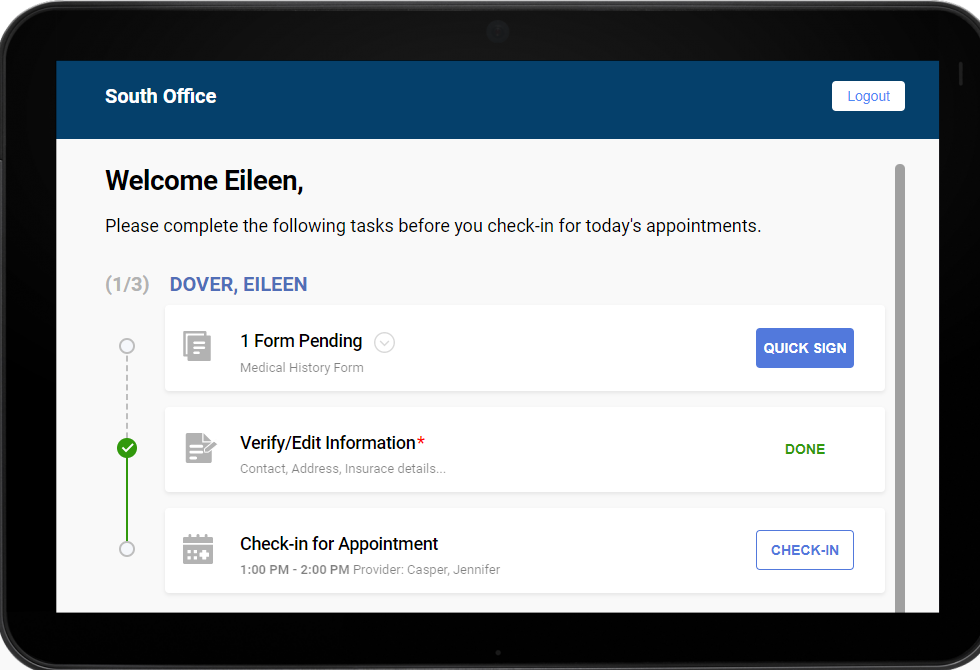
Allow your patients to check-in for appointments with a more intuitively designed Kiosk interface that guides them step-by-step through Forms and verifying information. https://vimeo.com/640549242
- Patient Engagement
-
- Appointment based campaigns target the appointment location instead of the home location. These are now clearly distinguished from the enabled locations.
- Content that is hard-coded into your office’s text message elements, like “Text C to confirm” and “Text OPTOUT to stop” are included in the previews and samples so you can see the whole picture.
- Patients that have multiple appointments scheduled will receive their campaign messages in order of the appointments regardless of any changes to the campaign.
Reporting and Analytics
- Find the value of your incoming referral sources. The Refer In report allows you to group and filter results by category or sub-category. You can even see the associated collection figures for the specified date range and lifetime.
- The Patient ID links in the Payment Reconciliation and Claims reports used to only get you as far as the Patient Overview. Then you then had to click a couple of times to get to the Ledger which is what you needed in the first place. Those links now bypass the Overview and go directly to the Ledger.
- Conveniently find totals for All Carriers in the Claims report, not just the top 10.
-
Get more information more easily in the Credit Balance report.
- New sorting functionality available. You can sort this report by Total Unapplied Credits, Advanced Payments, Account Outstanding and Account Unapplied Credits columns by clicking on the desired Column Header.
- See totals for those four columns on the last page of the report.
- New KPIs in Analytics. Look at Aging Summary by buckets (0-30, 31-60, etc) considers patient and insurance as well as any inactive providers.
- New KPI for Missing Transactions. Use this to see them at a glance and the team can investigate and see what actions need to be taken.
- Narrow your Procedures report by CDT category, with new columns to help you track the status of pre-authorizations, and to review by tooth, area, and surface.
- Customize the provider selection in all reports now that you won’t have to dig through as many. The Exclude Inactive Providers box will be unchecked by default on all reports.
Setup and Administration
- Rearrange your operatories within the Scheduler in any order you choose, regardless of the previous alphabetical order. (https://vimeo.com/722815052)
- Find your customized Medical Alerts -Conditions and Allergies, tucked under the Medical History section of Practice Settings.
-
- CareStack will prompt you to reactivate a previously deactivated Medical Alert instead of creating a new duplicated alert.
- Configure your text-to-pay messages to have location level branding and addresses instead of the account information for better name recognition and responses from your patients.
- Set Profile permission for the visibility of the Production Numbers within the scheduler. Profile->Scheduling->Scheduler->View Production Value.
- Patient Connect tasks and activities can be found in the Audit Log.
Beta
- ¿Hablas Espanol? Offer your Medical History in Spanish for your patients who prefer it. You’ll need to work on your translations, but once established, an easy toggle will allow you and your patient to seamlessly move between the languages.
- Find the perfect slot for patients that want to schedule multiple concurrent or consecutive appointments. Great for families or for practices that create separate doctor or hygiene appointments.
- Use a new advanced design for your statements with easier to read sections.
- Create customized membership plans that you manage locally to provide patients with a different way of receiving and paying for dental care without insurance. Requires CareStack Pay so your patients can pay the membership fee via a tokenized card.