
5.17 Release Features
With the launch of Online Booking and the improved Patient Portal next week, we were focused on that, but we still brought you a few highly requested features and lots of fixes.
Key Features
Change is Good for the Provider
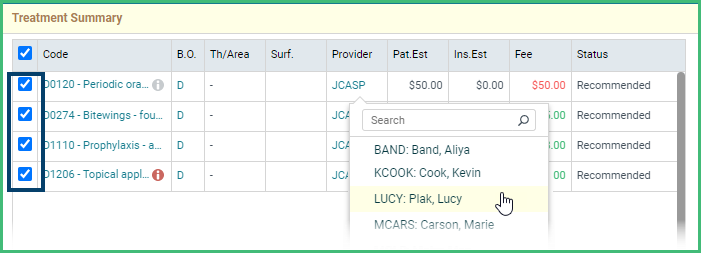
- Update Provider on Selected Treatments at Once. Easily change the provider on multiple treatments at once either in the appointment or in the chart, by selecting them and changing them in one fell swoop.
Transaction Charges Made Simple
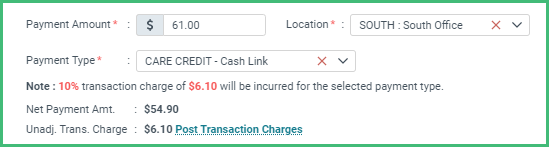
Simpler Anyway. Account for Care Credit transaction charges as you take the payment and easily post the adjustments. Video Reference: https://vimeo.com/524488018
Danger! Danger, Will Robinson!
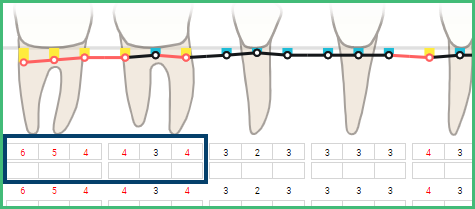
- Alert Depth in Alert Colors. Easily identify pocket depth measurements that reach or exceed your alert level with color-coded numbers in addition to the graph.
More Improvements
Revenue Cycle Management
- Use Claim Connect at the location level with separate credentials for easier tracking and management.
Front Office:
- Tell your patients exactly what you need in individual text messages. You aren’t limited to 160 characters but can go 1600 if you are willing to let the messages split.
- Patients that have both General and Ortho accounts can check-in through the kiosk without encountering issues with duplicate entries, freeing the front desk from worrying about it.
- Update the Billing Provider for selected treatments from the right-click menu.
Online Booking and Patient Portal
- Don’t miss when patients check in through the curbside option with a new green alert.
- Patients can update their own demographic details, including phone numbers, addresses, communication preferences, and status directly in the portal.
Reporting and Analytics
- Study the trends in important KPIs in your custom dashboards.
- Dig deeper into your Claims report with options to filter by claim flag in both the summary and detail version.
- Identify transaction charges as a special category in the Daily Journal and Payment Reconciliation reports for additional clarity and understanding of charges.
- The Payment Reconciliation report includes specific details for the locations of the transaction and the payment separately.
Setup and Administration
- Limit the users that can delete completed treatments while still allowing them to delete planned and existing treatments. (Permission is in the Treatment category)
- Further customize the coloring of the chart with options to choose any color of the rainbow for accepted treatments on those on hold.
- Work within the Analytics Dashboard more easily with improved organization.