
Our last release of the year has some exciting new options that make your job just a bit easier. Use the Practice Settings to set your preferred behavior and drive workflows.
Key Features
All for One and One for All
- Post all credit entries at once. When credit entries come from payment plans, the patient portal, and text-to-pay messages, they need to be posted to balances. You can have CareStack do the work. Describe the credits and how they should be posted while you sit back and watch.

Learn more in this video: https://vimeo.com/490029597
Get Your Kicks on Route 66
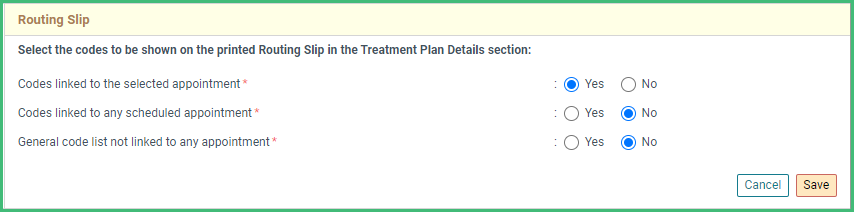
- Your Routing Slip will get you there. Include a patient’s scheduled treatments, current treatments, unscheduled treatments, or a glorious combination with new customization options. (Practice Settings -> Scheduler -> General Settings)
Production Types Produce for You
- Do more with more. Production types serve you better with expanded options for virtually any color and corresponding text colors. Use the default duration to speed scheduling and use the type duration instead of the tricky drag option. (Set your preference in Practice Settings -> Scheduler -> Scheduler Settings)

More Improvements
Billing and Insurance:
- Prepare your orthodontic payment plans before the treatment begins by using a future banding date.
Clinical:
- Help patients plan for a treatment and its cost now that the Unscheduled Procedures slider shows the fee.
- Work more quickly and with fewer clicks when adding treatments in the Advanced Planner. They will automatically go into the selected plan or phase instead of collecting in the Ungrouped section.
- Track more information about your referral providers by tagging them to a location.
Front Office:
- Customize your preferences for the Additional Information section in the Dashboard to identify which patients have unapplied credits in their accounts. (Enable the option in User Settings ->General -> Huddle Dashboard Customization.
- Identify the production type of an appointment and the patient’s reason for canceling an appointment within the Appointment slider.
- Patient Lists automatically include the condition to focus on Active patients. You can easily add more conditions or remove it. Those lists now include a hyperlink to open the patient detail pop-up
- Track your work getting patients scheduled for their recalls with a new ability to take notes on the. Customize your printed version at the location level. (Practice Settings -> Unscheduled Recalls slider Locations -> Print Settings -> Unscheduled Recalls)
- Focus on your current text messages. Those older than 30 days will be partially archived. Bring them back to see the history with the Load More Messages
- Identify the patient’s recall due date from the Short Call list to schedule the needed appointments all at once.
- See your production per operatory by hovering over the column header in the Scheduler.
Setup and Administration:
- As you create Account Filters, you will find them to be more intuitive with the selection of Specialties and Providers.
- Gather more specific information from your Income Allocation Report with expanded options for digging deeper and using more variables.
- Provide more detailed information in your Patient Engagement campaigns with new quick links for appointment location, address, and phone. You can also encourage patients to complete forms with new form quick links.