
5.12 Release Features
The release of 5.12 focused on behind-the-scenes improvements in speed and optimization. We still added features to make small tasks like printing and navigating easier.
Key Features
To Be or Not To Be
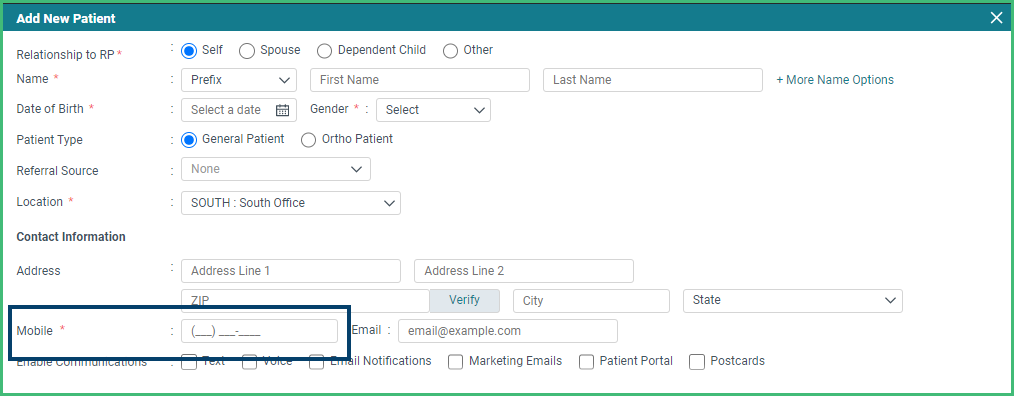
- Mandatory That Is. Collect the information you want for your new patients by identifying fields that should be mandatory as your team adds patients or as patients add themselves in the kiosk. Submit a support request to begin the process.
More Dash in the Dashboard
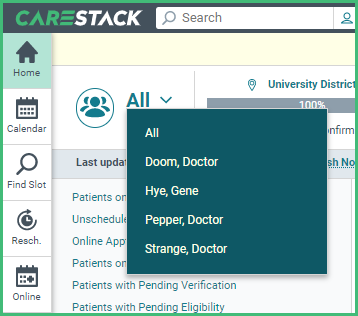
- Structure your Huddle Dashboard more quickly with easier provider selection. Providers are arranged alphabetically by the last name and you won’t have to wade through the inactive ones.
Insights Filters
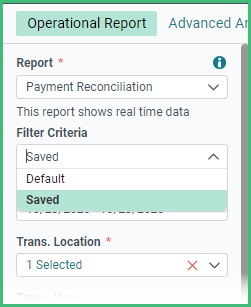
- Do I Have to Pick Them Again? Not anymore. Generate your reports with ease using your most recent set of filter criteria which is automatically saved for you.
More Improvements
Front Office:
- Save time and energy by letting patients update their addresses and contact information directly in the Kiosk.
- Print any of the Scheduler views for more flexibility.
- Jump to the patient’s Ledger from the Scheduler using the right-click menu.
- Manage your printed lab case records more easily with the patient’s name.
Billing and Insurance:
- Delete migrated balance codes entered in error to maintain accurate and complete financial records.
Clinical:
- Access your TigerView x-ray images via the cloud in the Clinical Software tab.
Setup and Administration:
- Create accurate production schedule records with the new ability to backdate your template maps for your Production Calendars.
- Create a special “In-house” provider to use for student and resident providers. These special providers cannot be the primary provider for appointments nor have codes completed.